

Related news
How to Review Dental CAD Designs Before Milling or 3D Printing
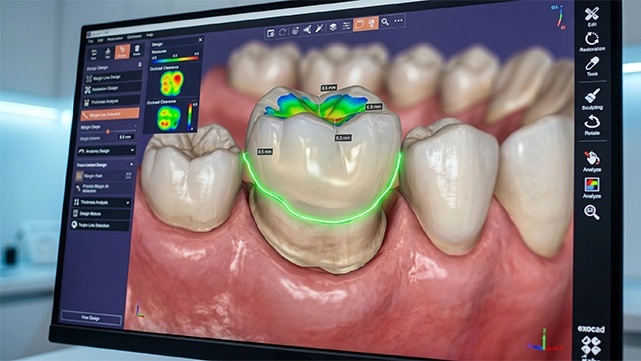
A clean screenshot does not guarantee a clean production file. The margin may be unclear on one side, the contact may be heavy, or the chosen material may not have enough room. Those are easier problems to fix before the file enters the machine queue.
At the workstation, the order is simple: identify the case, look at the scan, turn the design around, and decide what happens next.
What Should Be Checked Before the Technical Review?
Put the prescription beside the CAD file. Check the case reference, tooth number, arch, restoration type, material, and version. An old file attached to the correct case is still the wrong file.
Confirm the case and restoration details
- Match the case ID, tooth number, arch, and restoration type.
- Check the selected library or component against the prescription when applicable.
- Confirm the planned material and whether the file is for milling, printing, or review only.
- Make sure the latest approved version is being reviewed.
Check scan quality and model alignment
Open the preparation, adjacent teeth, opposing arch, and bite record together. If there is a hole near the margin, a clipped scan, a stitching jump, or a shifted bite, stop and ask for a better record. Editing around an uncertain scan usually creates another problem.
Which CAD Features Need a Detailed Review?
Rotate the design and use a section view when available. A facial screenshot helps explain a case, but it is not enough to release one.
Margin and finish-line continuity
- Follow the margin around the full preparation.
- Look for open edges, unsupported areas, sudden changes in height, or a line that does not match the scan.
- Confirm that margin position matches the prescription and available clinical information.
Contacts and occlusion
Compare contacts with the adjacent teeth and then check the opposing arch. A contact can look acceptable from above and still be too heavy on the insertion path. Follow the laboratory’s documented preference when one exists.
Thickness, connectors, and manufacturability
- Check whether the planned material has enough space in the thinnest areas.
- Inspect connector size and position in bridges or splinted restorations.
- Look for sharp internal transitions, deep undercuts, or geometry the selected machine cannot reproduce reliably.
- Confirm a workable path for milling, printing, sintering, finishing, and inspection.
How Should the Design Be Approved?
Keep the technical check and the release decision separate. When a correction is requested, write the reason beside the version number. The next reviewer should not have to search an old message thread.
Use a repeatable approval sequence
- Open the latest design and compare it with the prescription and scan.
- Review margin, contacts, occlusion, thickness, connectors, and insertion path.
- Record requested changes with a clear version label.
- Check the revised file before marking it ready for production.
- Archive the approved version with the production file.
What Changes Should Trigger a Second Review?
Send the file back through review after a meaningful change. This includes a new component library, a different material, a changed implant interface, or any edit that affects fit or thickness.
How SDS Can Support Dental CAD Quality Checks
SDS provides dental CAD design services for laboratories that need additional review or design capacity. A laboratory can discuss the intended restoration, production route, and review requirements before sending a case. For fixed restorations, the scope can be aligned with the laboratory’s own margin, contact, occlusion, and file-approval preferences. Final case acceptance and clinical approval responsibility should be confirmed for each project.
Conclusion
The point is practical: release a file the production team can understand and use. The prescription, scan, geometry, material, and manufacturing route should agree before the case moves on.
FAQs
Should every dental CAD file be reviewed before production?
For routine work, the check may take only a minute. Record it whenever the case is revised, outsourced, implant-related, or uses a new material.
What is the most common CAD review mistake?
Stopping at one view. Rotate the file, use a section view, and compare it with the opposing arch.
Who should approve the final design?
Name one release owner. An outside designer can prepare the file, but the lab should own the final release.
Can a CAD review replace a clinical review?
No. It checks the digital file and production readiness; clinical decisions stay with the responsible dental professionals.
What should be recorded after a design revision?
Note the version, the change, the reviewer, and the release status.
Contact Us